
Bermuda business resource
Bermuda PIPA,
in plain English.
Understand what your business needs to think about when handling personal information. Start with 18 practical checks, then turn the gaps into clear next steps.
Free PDF · One page · Fillable fields · Print or complete digitally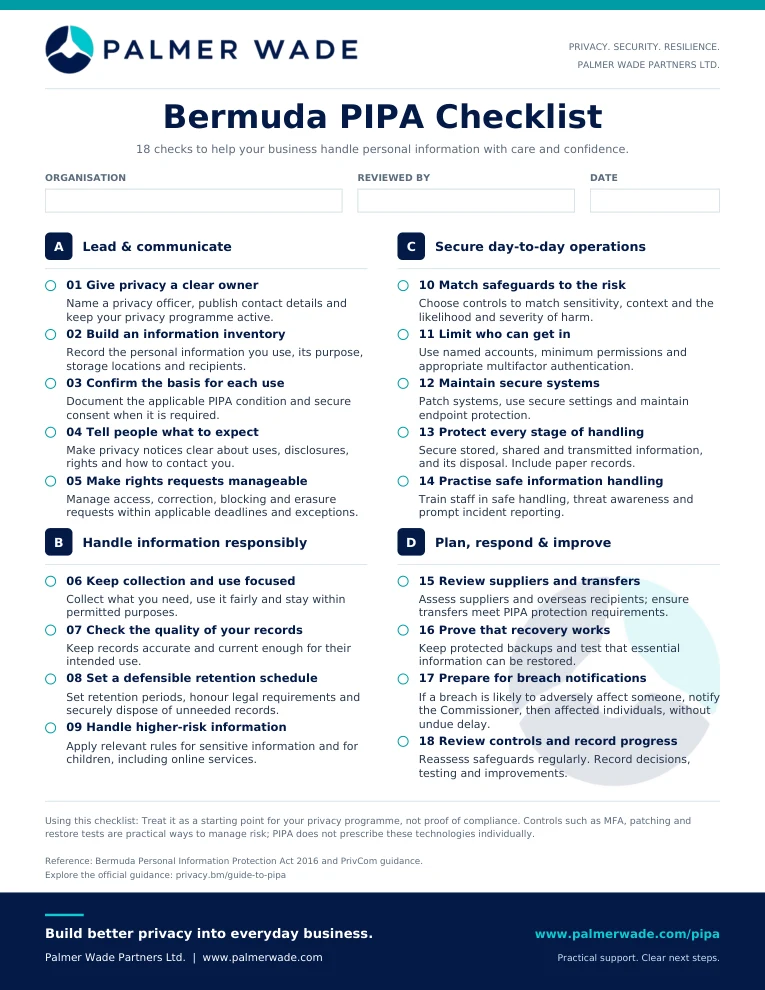
Start with the basics
Privacy is part of how
your business works.
PIPA is Bermuda's Personal Information Protection Act 2016. Fully implemented on 1 January 2025, it sets rules for how organisations use personal information, subject to the Act's scope and exceptions.
A privacy notice is one part of the picture. You also need to understand your information, who can use it, where it goes and how it is protected.
A Checks 01–05
Lead & communicate
Give privacy a clear owner and make it easy for people to understand what happens to their information.
01Give privacy a clear owner
Someone needs to keep privacy work moving, answer questions and coordinate requests. Designate a privacy officer and support them with clear policies and a practical privacy programme.
In practice: Make sure staff know who to contact before sharing information in a new way.
02Build an information inventory
Write down what personal information you hold, why you need it, where it lives and who receives it. Include the everyday tools that are easy to overlook.
In practice: Check email, spreadsheets, booking forms, cloud folders and paper files.
03Confirm the basis for each use
Be clear about the PIPA condition that allows each use of personal information. Consent is one possible condition, but it is not the only one. Where consent is required, make it clear and meaningful.
In practice: Do not assume permission to fulfil an order also covers unrelated marketing.
04Tell people what to expect
Explain what you use information for, who it may be shared with and how people can exercise their rights. Keep your privacy notices understandable and aligned with what the business actually does.
In practice: Review the notice when you introduce a new form, service or supplier.
05Make rights requests manageable
Have a process for requests to see, correct, block or erase personal information, subject to the applicable rules and exceptions. Know how to recognise a request, verify the person and meet the relevant deadline.
In practice: An access request can arrive in an ordinary email, not just on your preferred form.
B Checks 06–09
Handle information responsibly
Keep what you need, use it for the right reasons and avoid holding on to it indefinitely.
06Keep collection and use focused
Ask for information because you need it for a clear purpose. Use it fairly and within permitted purposes rather than collecting extra details just in case.
In practice: If a contact form only needs a name and email address, question why it asks for a date of birth.
07Check the quality of your records
Keep information accurate and up to date to the extent needed for its use. Give staff a straightforward way to correct mistakes.
In practice: Update an outdated customer address before sending documents containing personal information.
08Set a defensible retention schedule
Decide how long different records need to be kept, taking legal requirements into account. When they are no longer needed, dispose of them securely rather than leaving them in forgotten folders.
In practice: Give customer records, recruitment files and old exports their own retention decisions.
09Handle higher-risk information
Some information requires additional care. Check the rules for sensitive personal information and for information about children, including the specific requirements for online services.
In practice: Review who can access health information and what a child-facing service collects.
C Checks 10–14
Secure day-to-day operations
Put sensible protection around your accounts, devices and information, and help your people use it well.
10Match safeguards to the risk
Choose protection based on the sensitivity of the information, how it is used and the harm that loss or misuse could cause. Review those choices as the business changes.
In practice: A folder of medical records needs a different level of care from a public brochure.
11Limit who can get in
Give people their own accounts and only the access they need. Use appropriate multifactor authentication, or MFA, to add a second check when signing in.
In practice: Remove access promptly when someone leaves or changes roles.
12Maintain secure systems
Keep software updated, use secure settings and maintain suitable endpoint protection. This applies to the laptops, phones and other systems used for business.
In practice: Assign someone to check that security updates actually installed.
13Protect every stage of handling
Consider how information is stored, sent, shared and destroyed. Digital files and paper records both matter.
In practice: Check a recipient before emailing a sensitive attachment and use a secure sharing method.
14Practise safe information handling
Give staff clear guidance on handling personal information, spotting suspicious messages and reporting mistakes quickly. Training should relate to their actual work.
In practice: Make it easy to report a misdirected email or lost device immediately.
D Checks 15–18
Plan, respond & improve
Know your suppliers, test your recovery arrangements and prepare for difficult decisions before an incident.
15Review suppliers and transfers
Understand which providers handle personal information and where it goes. Assess overseas recipients and ensure transfers meet the applicable PIPA protection requirements.
In practice: Check cloud storage, payroll, booking and marketing providers, including relevant subcontractors.
16Prove that recovery works
Keep protected backups and test whether you can restore the information the business needs. A successful backup message alone does not prove recovery will work.
In practice: Restore a sample of important files and check that they open and are usable.
17Prepare for breach notifications
Plan how to contain, assess and document a breach. Where a breach involving personal information is likely to adversely affect an individual, PIPA requires notification to the Commissioner, then affected individuals, without undue delay.
In practice: Keep an escalation contact list and record what happened, the likely effects and the response.
18Review controls and record progress
Privacy work needs periodic review. Keep a record of what you checked, what needs to change, who owns the action and when it will be reviewed.
In practice: Revisit access, suppliers and safeguards when you change systems or launch a service.
Put the checklist to work
Know where to start.
Decide what comes next.
Work through the checklist with the person responsible for privacy and the people who manage your systems. For each gap, agree an owner and a next action.
Palmer Wade can help you review information flows, access, suppliers and everyday processes, then turn the findings into a practical action plan.
A few useful answers
Does completing this checklist make us compliant?
No. It helps identify work to do and questions to resolve. Your obligations depend on your circumstances, and ticking every item is not a compliance assessment or certification.
Do we need to buy particular security products?
PIPA calls for appropriate safeguards that fit the risks. MFA, security updates and recovery tests are practical examples, rather than technologies individually prescribed by the Act. Start with the gaps in your current arrangements.
Can Palmer Wade help with the next steps?
Yes. We provide readiness, governance, process and implementation support. Where a question needs legal interpretation or specialist security work, we help define the requirement and coordinate an appropriate handoff.
Official guidance and scope
This is a practical explainer, not legal advice or a complete statement of PIPA. Use the Act and guidance from Bermuda's Office of the Privacy Commissioner (PrivCom) when assessing your obligations.
- PrivCom Organisations' Hub: legislation and resources
- Official Guide to PIPA
- Security safeguards and breach notification guidance
Palmer Wade Partners Ltd. · Guide updated October 2026